
Modeling the 1D duct network
This topic explains how to model convection in a 1D duct network using two general approaches.
This lesson may include hands-on exercises. Review the Discussion section for background information or click the button to proceed to the practical section.

Discussion
There are two general approaches for modeling a 1D duct network:
- Applying mass flows based on external 1D results.
- Applying pressures based on external 1D results.
Use the Duct Flow Boundary Condition simulation object to model 1D duct network.
- Applying mass flows based on external 1D results
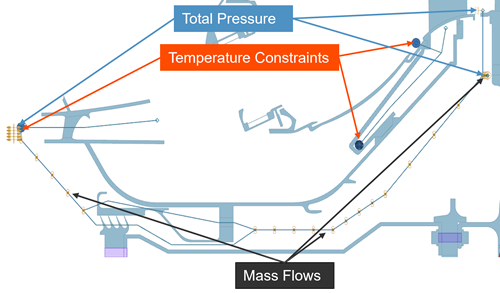
- Use the following boundary conditions:
- Temperature constraint to define temperature at the nodes.
- Duct Total Pressure or Duct Static Pressure to define pressure at the nodes.
- Duct Opening to define pressure and temperature at the inlet or outlet of a duct network.
- Duct Fan/Pump to define mass flow in a duct network.
 Tip:It is recommended to use the Duct with Mass Flow or Duct with Mass Flow Axisymmetric physical property when meshing the ducts. If you use the Duct physical property, the model becomes over constrained, which will lead to unexpected results.
- Comparing standard and axisymmetric ducts with mass flow
- When modeling convective heat transfer in cyclically symmetric models or
models that contain plane-stress or axisymmetric elements, you can use
either Duct with Mass Flow or Duct with
Mass Flow Axisymmetric. Both support cyclic symmetry, but
the thermal solver computes heat transfer differently for each duct
type.
Duct with Mass Flow
- Computes heat transfer directly using the 1D duct geometry and flow conditions.
- Does not expand the duct geometry circumferentially.
- Couples the cyclically symmetric solid segment directly to the 1D duct representation.
Duct with Mass Flow Axisymmetric
- Expands the duct geometry circumferentially around the axis of rotation.
- Computes heat transfer using the expanded axisymmetric representation.
- Couples the cyclically symmetric solid face to the expanded duct representation.
- Solver treatment of duct with mass flow elements
- Since no cross section is defined for 1D duct with mass flow elements, the
thermal solver does not calculate pressure and fluid resistance. The thermal
solver only calculates mass flow and temperature resulting from convection
with the thermal elements.
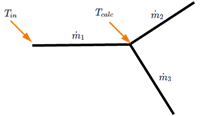
- If a junction point has a remaining mass flow imbalance, the solver adds a compensating mass flow injection or loss at this junction.
- There is only convection through 1D duct with mass flow elements.
- Comparing duct types
- The following table compares standard mass flow ducts with axisymmetric mass
flow ducts.
Aspect Duct with Mass Flow Duct with Mass Flow Axisymmetric Coupling to cyclically symmetric body Couples directly to 1D duct geometry Duct expanded circumferentially and coupled Mass flow interpretation Total mass flow across all segments Total mass flow across all segments Typical use cases 3D cyclic symmetric bodies Plane stress edges, axisymmetric edges Mixed geometry support Limited Supports mixed geometries Different segment counts Not supported Supported When to use - Coupling to 3D cyclic symmetric bodies
- Geometry is fully 3D and symmetry is handled at the solid level
- Coupling to plane stress edges
- Coupling to axisymmetric edges
- Connecting:
- Axisymmetric edges to 3D cyclic symmetric faces
- Cyclic symmetric bodies with different numbers of segments
- Applying pressures at openings
- Use the Duct Total Pressure to apply the total gauge
fluid pressure at a point, mesh point, node, polygon edge, or curve within
the duct network. The total pressure is the sum of static pressure and
dynamic pressure. It applies pressure to all surfaces attached to selected
ducts via Thermal Coupling - Convection.
It is recommended to select curves or polygon edges when you specify fluid pressure in a duct network because this allows you to retain the boundary condition selection when you remesh the model.
- Assigning a boundary condition ID to the ducts
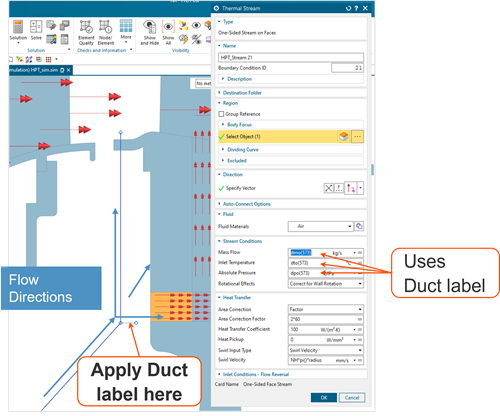
- Use the Duct Label type of Duct Flow
Boundary Condition to assign a boundary condition ID to 1D
duct curves/elements for reference in other boundary conditions using the
following thermal-flow functions:
- DMO(i) returns the duct mass flow.
- DPO(i) returns the duct outlet pressure.
- DTO(i) returns the duct outlet temperature.
Where "i" is the duct label ID.
- Defining thermal convection coupling
- Convective thermal couplings model the convective heat transfer between a
solid surface and a contacting fluid.
The convective heat transfer is defined as:
Use the Convection Coupling type of the Thermal Coupling - Convection simulation object to model convective heat transfer between the duct fluid elements and the convecting region.
Use the Duct Node Convection Coupling type of the Thermal Coupling - Convection simulation object to model convective heat transfer between the duct’s fluid nodes and the convecting region.
Both are similar to a stream or a void and include inputs for HTC and Total Temperature effects.
- Considering adiabatic wall temperature for heat transfer
- Use adiabatic wall temperature instead of the fluid temperature for heat
transfer calculations in Thermal Convecting Zone and
Thermal Coupling Convection to obtain accurate
convective wall heat fluxes for flows with significant viscous heating such
as high-speed flows in rotating and stationary machinery.
The thermal solver computes the wall heat flux as:
The adiabatic wall temperature Taw on the stator side is:
The adiabatic wall temperature Tw on the rotor side is:
Where:
- is the recovery
factor, which is calculated as:
, where the Prandtl number is calculated at:
- is the heat transfer coefficient.
- is the wall temperature.
- is the adiabatic wall temperature.
- is the fluid temperature near the wall.
- is the fluid static temperature.
- is the specific heat of the fluid material at .
- is the relative
tangential velocity, which is calculated as:
- is the swirl velocity.
- is the wall tangential velocity.
The Adiabatic Wall Temperature for Heat Transfer Calculations option is also available in Thermal Coupling – Convection and Duct Node Convection Coupling.
- is the recovery
factor, which is calculated as:
Hands-on material
To gain experience with the topics discussed here, complete the following:
