
Condition sequences
This topic explains how condition sequences define and manage engine operating conditions over a mission cycle in WEM.
This lesson may include hands-on exercises. Review the Discussion section for background information or click the button to proceed to the practical section.

Discussion
Engine performance data—such as mass flow, temperature, pressure, shaft power, and rotational speed—is extracted at key stations for different engine loads and used as input to define the engine mission cycle.
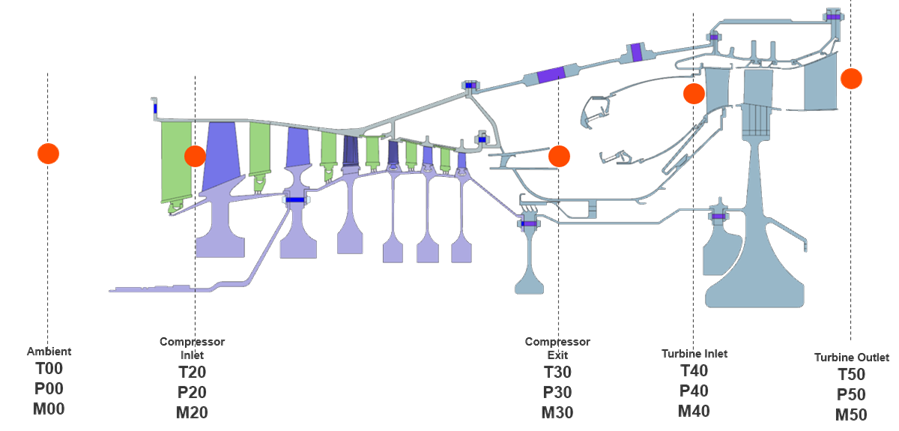
Use the Condition Sequence command to apply these operating conditions across multiple engine states in a structured and consistent way.
- Define how boundary conditions vary over the engine duty cycle.
- Define time-dependent temperatures, pressures, and mass flows at various locations in the engine.
- Enable users to run analyses at multiple transient profiles or engine conditions.
- Link thermal boundary conditions to condition sequence parameters.
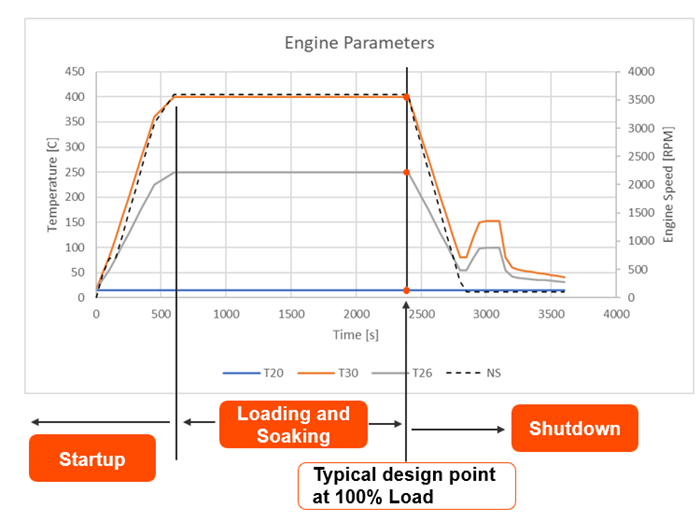
A condition sequence consists of:
- Parameters, which are variables such as temperature, pressure, mass flow, or rotor speed.
- Conditions, such as specific engine states, for example, 50% load, 100% load defined by parameter values.
- Sequence, which is a time-ordered set of conditions forming the mission profile.
In practice, engineers define parameters that drive physics, assign values for each condition (engine operating point), and define time steps to create the full mission cycle profile.
When you define a condition sequence, the software creates a table field for each condition parameter. The software then uses the field function to automatically create a locked expression for each table field.
After you create a condition sequence, use the New Solution from Condition Sequence command to create a solution with the appropriate time steps for the condition sequence. If you change the condition sequence, use the Update from Condition Sequence command to update the solution.
To share condition sequences between models or users, or to create them outside Pre/Post, export condition sequences in XML or BDD format. When imported, all existing condition sequences, conditions, and parameters in the Simulation file are replaced by those from the imported file.
Hands-on material
To gain experience with the topics discussed here, complete the following:
