
Understanding radiation modeling with axisymmetric and plane-stress elements
This topic explains how the thermal solver models radiation in axisymmetric and mixed 2D axi-3D models, including transparency corrections and radiative behavior for plane-stress elements.
This lesson may include hands-on exercises. Review the Discussion section for background information or click the button to proceed to the practical section.

Discussion
For a model meshed with axisymmetric elements:
- The thermal solver revolves the model around the axis of rotation to create a 3D representation.
- Radiative view factors and conductances are computed as in a true 3D model.
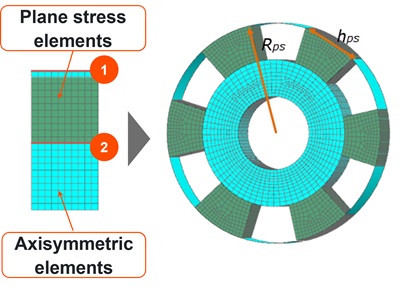
For mixed 2D axi-3D models containing plane stress elements, the thermal solver uses a simplified axisymmetric radiation treatment, by creating axisymmetric elements with specific optical properties on top of the plane stress element edges.
In the following example, axisymmetric elements (in blue) created on top of the plane stress elements (in green) in 2D and 3D with external edge (1) and internal edge (2).
- Transparency correction for plane-stress elements
-
The thermal solver treats plane-stress elements with multiple instances as semi-transparent elements to account for partial circumferential coverage.
The transparency of plane-stress elements depends on the ray direction:
- When a ray travels from an external edge to an internal edge between axisymmetric and plane-stress elements, the plane-stress elements are semi-transparent.
- When a ray travels from an internal edge to an external edge, the plane-stress elements are fully transparent.
Hands-on material
To gain experience with the topics discussed here, complete the following:
