
Meshing a model
This lesson introduces the core meshing workflow in Simcenter 3D Pre/Post, including element selection, mesh creation, mesh organization, and assignment of material and physical properties.
This lesson may include hands-on exercises. Review the Discussion section for background information or click the button to proceed to the practical section.

Discussion
- Selecting mesh and element types
- Simcenter 3D Space Systems Thermal supports the following element types to represent different physical behaviors and modeling needs.
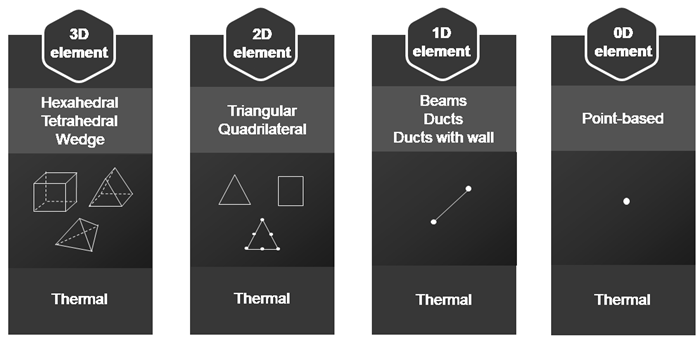
You can also generate 3D meshes from existing 2D shell meshes, where the 2D mesh controls the size and type of the resulting 3D elements.
- Mesh collectors and material assignment
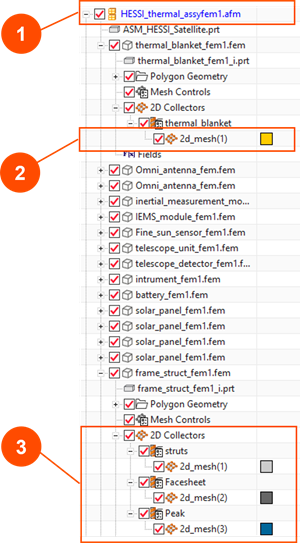
- Meshes are organized using Mesh Collectors, which group meshes that share the same element family and properties. Use mesh collectors to:
- Work with complex, non-homogeneous models, or models based on assemblies (1).
- Display specific areas of the model (2).
- Create logical groupings of meshes to help you manage models (3).
- Improve performance with large models.
All meshes, except those with null element types, must have Material Properties assigned. The required material properties to perform a thermal analysis are listed in the following table.
Material property Variable with Required for Mass density Constant Transient analysis Thermal conductivity Temperature Transient analysis and steady state Specific heat Temperature Transient analysis Emissivity Constant Radiation simulation Latent Heat, Phase Change Temperature, Specific Heat above Heat Change Constant Phase change simulation - Defining Physical Properties
- Physical Properties describe characteristics such as thicknesses, nonstructural mass, and thermal behaviors, and are assigned to mesh collectors. Different physical property types are used depending on the element type:
- 0D properties define concentrated mass for thermal capacitance.
- 1D properties model beams or ducts for simplified thermal behavior.
- Thin shell properties define thickness and nonstructural mass for shell elements.
- Multi-layer shell properties allow modeling of layered structures with different materials and thicknesses.
Hands-on material
To gain experience with the topics discussed here, complete the following:


