
How to organize and reuse thermo-optical properties
This article explains how to organize, reuse, import, and export thermo-optical properties using the thermo-optical properties manager.
You can create reusable thermo-optical properties datasets that can be applied across multiple boundary conditions and models, or shared between analysts.
With the thermo-optical manager, you can:
- Import and export thermo-optical properties to share data between models and users (1).
- Create and maintain a reusable library of thermo-optical properties.
- Import properties from the default catalog file: [software_installation]\NXCAE_extras\tmg\if\catalogs\optical_prop.xml (2).
- Filter properties by the type (3) or name (4) to quickly find relevant entries.
- Resolve name conflicts (5).
- Inspect properties from external XML files before importing (6).
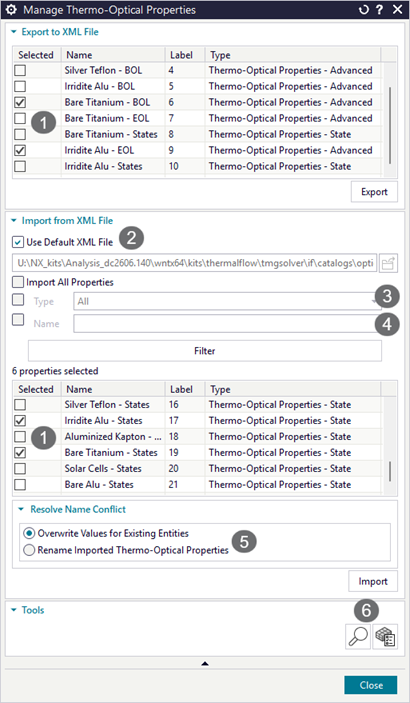
Both constant-value and table-based thermo-optical properties are supported.
Import thermo-optical properties
To reuse thermo-optical properties from another model or import them from a catalog, follow these steps.
Prerequisites: XML file containing thermo-optical properties in a compatible format.
-
Choose .
- (Optional) Inspect an external file:
- In the Tools group (6), click Inspect external file containing Thermo-Optical Properties modeling objects.
- Select the XML file and review its contents.
- In the Import from XML File group, click Browse and select a file containing thermo-optical properties or you can select Use Default XML file to import properties from the default catalog file.
- (Optional) You can limit the thermo-optical properties for import using filtering options (3), (4).
- Resolve naming conflicts if exist (5). A naming conflict arises when you
import a property with the same name as an existing property in the model.
To resolve this, you can:
- Overwrite the thermo-optical values with the imported ones for modeling object with identical names.
- Import the thermo-optical properties without overwriting the existing properties by renaming the imported ones.
- Click Import, then Close.
Export thermo-optical properties
To save and share thermo-optical properties for use in other models, export them to an XML file as described below.
Prerequisites: Thermo-optical properties defined in the FEM or Simulation file.
The properties available for export depend on the active file:
- FEM file active — Only properties created in the FEM file are listed.
- Simulation file active — Properties from both Simulation and FEM files are listed.
-
Choose .
- In the Export to XML File list, select properties to export (1).
- Click Export.
- In the Save As dialog box, specify the file name and location.
- Click Close.