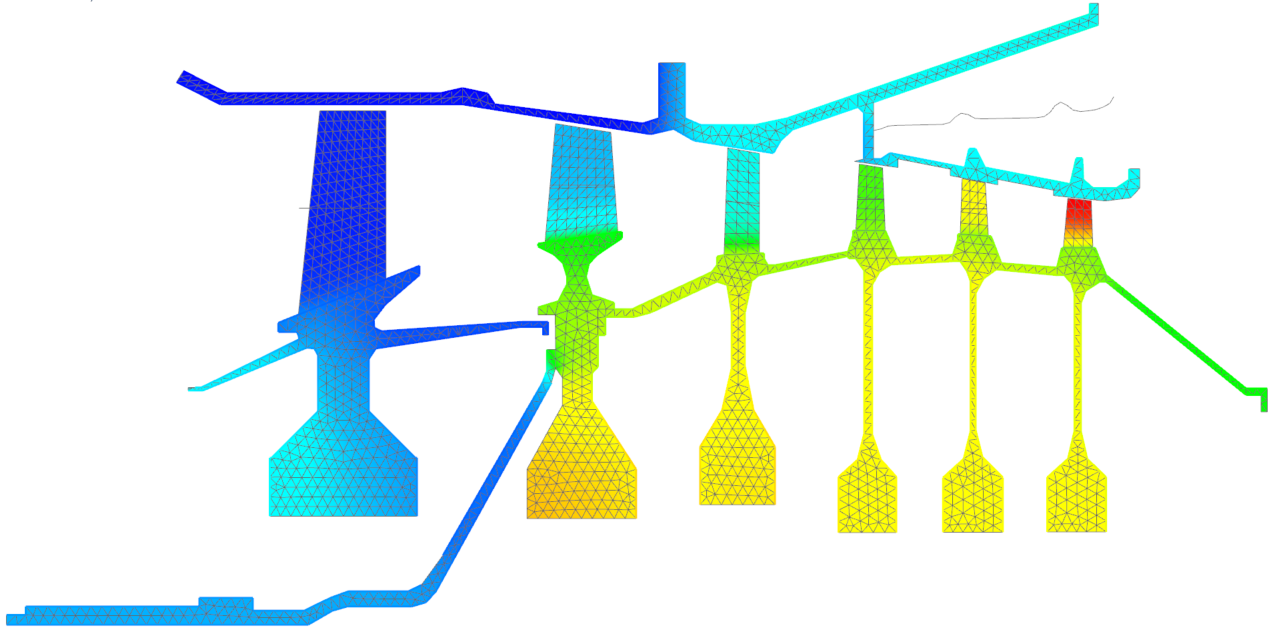
Use a plugin function to specify a heat transfer coefficient
Practice writing a plugin function and defining a heat transfer coefficient using the plugin function in the thermal stream boundary condition.
Write a plugin function (Optional)
You can write a plugin function to use it in the thermal stream boundary condition as follows or open the plugin.cpp source file that was created already in the plugin_function/Source file folder to investigate it.
You will define a plugin function that computes the heat transfer coefficient, h, as follows:
- is the Prandtl number.
- is the Grashof number
- is the Rayleigh number.
- is the fluid conductivity.
- is the plate length.
- is the fluid viscosity.
- is the fluid specific heat.
- is the fluid density.
-
Include the header files in the source file. Every plugin function must
contain a header file inclusion directive, which contains definitions for
the API methods.
#include <CaeUtils_Exp_IMaterial.hxx> #include <CaeUtils_Exp_IContext.hxx> #include <CaeUtils_Exp_IScalarValue.hxx> #include <CaeUtils_Exp_ITableValue.hxx> #include <CaeUtils_Exp_IFieldValue.hxx> #include <CaeUtils_Exp_IReturnValue.hxx> #include <CaeUtils_Exp_IFunctionDefinition.hxx> #include <CaeUtils_Exp_IRegistrar.hxx> -
Define the default values for function arguments.
const double UNDEF_VALUE = -1.33e33; const UGS::CaeUtils::Exp::DefValue DEFAULTS = {UNDEF_VALUE, 0, NULL, false}; -
Initialize your plugin function.
Simcenter 3D calls the
Initialize_Versionedfunction and the thermal solver calls the Initialize function to load the plugin functions. For your convenience, you can write theAddFunctionsfunction to list all your plugin functions, as shown:void AddFunctions(IRegistrar* pReg) { AddHTC(pReg); } extern "C" __declspec(dllexport) void Initialize(UGS::CaeUtils::Exp::IRegistrar* pReg) { AddFunctions(pReg); } extern "C" __declspec(dllexport) void Initialize_Versioned(UGS::CaeUtils::Exp::IRegistrar* pReg, int nVersionNumber) { AddFunctions(pReg); nVersionNumber = 110001; } -
Define the
HTC()plugin function that computes a heat transfer coefficient, h, as described above.// Forced convection from a flat plate void HTC(const IContext* pContext, const ArgData* pArgs, IReturnValue* pRet) { double result = 0.1; // Input arguments // Plate length double L = pArgs->m_doubleArgs[0]; const IMaterial* pMaterial = pContext->GetFluidMaterial(); if (!pMaterial) { pRet->SetDouble(result); // pRet->SetErrorMsg("The fluid material is not defined while calling HTC plugin function."); return; } bool boolResult = true; // Properties of the fluid material double fluidTemperature = 0.0; boolResult = pContext->GetFluidTemp(&fluidTemperature); if (!boolResult) { pRet->SetDouble(result); // pRet->SetErrorMsg("The fluid material temperature is not defined while calling HTC plugin function."); return; } double Tf = fluidTemperature; // Properties of the surface material double surfaceTemperature = 0.0; boolResult = pContext->GetTemperature(&surfaceTemperature); if (!boolResult) { pRet->SetDouble(result); // pRet->SetErrorMsg("The surface material temperature is not defined while calling HTC plugin function."); return; } double Ts = surfaceTemperature; double Tmean = 0.5*(Tf + Ts); double fluidPressure = 0.0; boolResult = pContext->GetFluidPressure(&fluidPressure); if (!boolResult) { pRet->SetDouble(result); // pRet->SetErrorMsg("The fluid material pressure is not defined while calling HTC plugin function."); return; } double fluidMassFlowRate = 0.0; boolResult = pContext->GetFluidMassFlowRate(&fluidMassFlowRate); if (!boolResult) { pRet->SetDouble(result); // pRet->SetErrorMsg("The fluid mass flow rate is not defined while calling HTC plugin function."); return; } // fluidConductivity double k = pMaterial->GetThermalConductivity(Tmean, fluidPressure); if (k == 0.0) { pRet->SetDouble(result); // pRet->SetErrorMsg("The fluid material thermal conductivity equals 0 while calling HTC plugin function."); return; } double fluidViscosity = 0.0; const IScalarValue* pScalar = pMaterial->GetScalarProperty("DynamicVisc"); if (pScalar) fluidViscosity = pScalar->GetValue(); else { const IFieldValue* pField = pMaterial->GetFieldProperty("DynamicVisc"); if (pField) { std::vector<double> temperatures(1); temperatures[0] = fluidTemperature; double* viscosities = pField->GetInterpolatedValue(temperatures); fluidViscosity = viscosities[0]; delete[] viscosities; } } if (fluidViscosity == 0.0) { pRet->SetDouble(result); pRet->SetErrorMsg("The fluid material dynamic viscosity equals 0 or not defined while calling HTC plugin function."); return; } double fluidDensity = pMaterial->GetDensity(Tmean, fluidPressure); if (fluidDensity == 0.0) { pRet->SetDouble(result); pRet->SetErrorMsg("The fluid material density equals 0 while calling HTC plugin function."); return; } double fluidSpecificHeat = pMaterial->GetSpecificHeat(Tmean, fluidPressure); if (fluidSpecificHeat == 0.0) { pRet->SetDouble(result); pRet->SetErrorMsg("The fluid material specific heat equals 0 while calling HTC plugin function."); return; } // Prandtl Number double Pr = fluidViscosity * fluidSpecificHeat / k; // This stuff needs to be in solution units. In our case it is [mm/s^2] double grav = 9810; double beta = 0.00341; // HTC correlation double grashof = std::abs(grav * beta * (Ts - Tf) * L * L * L / ((fluidViscosity * fluidViscosity) / (fluidDensity * fluidDensity))); double rayleigh = grashof * Pr; result = 0.45 * std::pow(rayleigh, 0.8) * k / (10000*L); #if 0 std::cout << std::endl; std::cout << "Plate length: " << L << std::endl; std::cout << "Fluid Viscosity: " << fluidViscosity << std::endl; std::cout << "Fluid Temperature: " << fluidTemperature << std::endl; std::cout << "Fluid Pressure: " << fluidPressure << std::endl; std::cout << "Fluid Density: " << fluidDensity << std::endl; std::cout << "Fluid Conductivity: " << k << std::endl; std::cout << "Fluid Specific Heat: " << fluidSpecificHeat << std::endl; std::cout << "Fluid mass flow rate: " << fluidMassFlowRate << std::endl; std::cout << "Surface Temperature: " << surfaceTemperature << std::endl; std::cout << "Mean Temperature: " << Tmean << std::endl; std::cout << "Prandtl Number: " << Pr << std::endl; std::cout << "Grashof: " << grashof << std::endl; std::cout << "Rayleigh: " << rayleigh << std::endl; std::cout << "Result: " << result << std::endl; #endif pRet->SetDouble(result); } -
Register your
HTC()plugin function.void AddHTC(IRegistrar* pReg) { Measure meas; meas.Set(1, 0, -3, 0, 0, 0, -1, 0, 0); IFunctionDefinition* pFunc = pReg->AddFunction("HTC", "Return heat transfer coefficient from forced convection from a flat plate", meas, TYP_DBL, "Heat transfer coefficient", &HTC); pFunc->AddDependency(DEP_TIME); // Plate length Measure measL; measL.Set(0, 1, 0, 0, 0, 0, 0, 0, 0); // Length pFunc->AddArg("L", "Plate length", TYP_DBL, measL); } -
Add your plugin function to the source code.
Use
AddFunctions, which is described in step 3, to add your plugin function to the structure of the source code.void AddFunctions(IRegistrar* pReg) { AddHTC(pReg); }
Compile the plugin function (Optional)
If you have a Windows compiler installed, compile the source code for your plugin function.
- Make sure the script is located in the same working directory as your source file.
- Locate a sample compilation script in the [installation_path]\nxcae_extras\tmg\plugin_examples\thermal_solver\ExpressionsShell folder.
-
Open the build_windows.cmd script in any text editor,
and edit the script to specify the correct compiler and the name of the
plugin function.
Notice, in the script below, the correct compiler is intel64 vs2017 and the name of the plugin function is plugin.cpp.
@echo off set ComSpec=%SystemRoot%\system32\cmd.exe if exist "C:\Program Files (x86)\IntelSWTools\compilers_and_libraries\windows\bin\ia32" ( call "C:\Program Files (x86)\IntelSWTools\compilers_and_libraries\windows\bin\ifortvars.bat" intel64 vs2017 goto cprograms ) :cprograms cl /FoUserFunctions.obj /c plugin.cpp /TP /GR /nologo /I%UGII_BASE_DIR%\ugstructures\evalplugin\src /W3 /EHsc /O2 /MT /I. link /nologo /LIBPATH:%UGII_BASE_DIR%\nxbin\ /MANIFEST /dll /out:user_plugin.dll UserFunctions.obj PAUSE -
Double-click the build_windows.cmd file.
Notice that the user_plugin.dll file is created in the working directory.
For your convenience, the user_plugin.dll file is included with this activity in the plugin_function folder. You do not need to compile your source .cpp file.
Open the Simulation file
- Choose File → Open and open plugin_function\gas_turbine_axi_fem1_i_sim1.sim.
- Choose File→Preferences→User Interface and on the Dialog and Precision page, reset the dialog box memory.
- Click OK.
Load the user_plugin.dll file in Simcenter 3D
- Choose File tab→Utilities→Customer Defaults.
- Choose Simulation→Pre/Post→Expressions.
- In the Plugin tab, select the Use Custom Plugin check box.
-
In the Custom Plugin box, type the full path for the
user_plugin.dll file.
For example: D:\plugin_function\user_plugin.dll.
- Click OK.
- Click OK on the Customer Defaults warning, and restart your Simcenter 3D session.
Define the heat transfer coefficient on the thermal stream using a plugin function
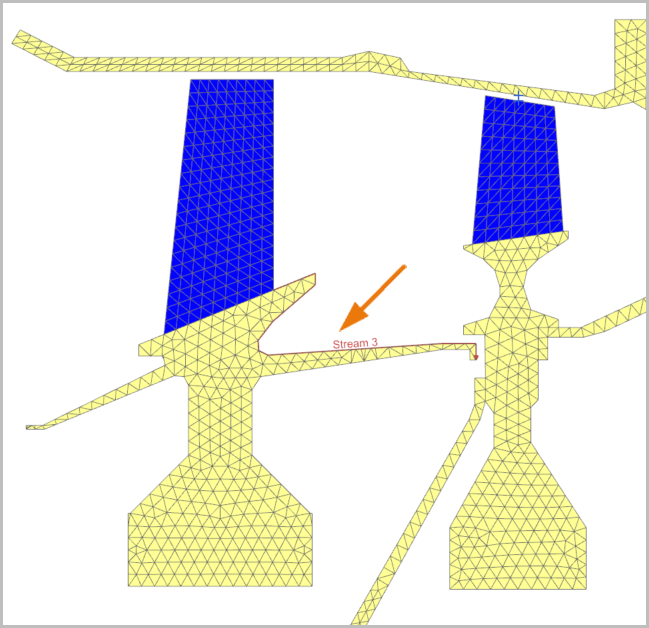
Notice that the Simulation file contains the WithoutContact solution, which already has thermal and structural boundary conditions defined. You will modify the Stream 3 load by assigning the user plugin function to its heat transfer coefficient.
- In the Simulation Navigator, expand the WithoutContact node→Loads→Streams.
-
Show Stream 3 to visualize the stream in the graphics window.
- In the Simulation Navigator, right-click the Stream 3 node and select Edit.
-
In the Heat Transfer group, in the Heat
Transfer Coefficient box, type
HTC(143[mm]).
The heat transfer coefficient is defined using an expression, which contains the HTC() function you defined in the user-defined plugin DLL file. This function returns the convection coefficient from a HTC correlation. You define the plate length equal to 143 mm as the function's argument. The plate length corresponds to the length of stream 3 along the edge where it travels.
- Click OK.
Solve the model
- In the Simulation Navigator, right-click the WithoutContact node and choose Solve.
- Click OK.
- Wait for Completed to display in the Analysis Job Monitor dialog box, before proceeding.
- In the Review Results dialog box, click No.
- Close the Information window.
- In the Analysis Job Monitor dialog box, click Cancel.
Display the temperature results
Display nodal temperature for time 2000 s.
- In the Simulation Navigator, expand the Results node and double-click the Thermal node.
- Expand Thermal→Time 2000.0→Inscrement 38, 2000s.
- Double click the Temperature - Nodal node.
-
Under the Contour Plots node, expand
Post View 1, and clear the 0D
Elements check box.