
Multispectral band analysis
This article explains how to use multispectral band analysis to model non-gray radiation when optical properties vary significantly with wavelength. This approach is especially useful in cryogenic systems and in models where absorption and emission occur in different spectral ranges.
Why multispectral band analysis matters
Many thermal-radiation analyses use the gray-body approximation, which treats surface emissivity and other thermo-optical properties as independent of wavelength. This approximation can be effective when the radiating surfaces have similar absolute temperatures and their optical properties do not vary significantly over the wavelength range that contributes most to the radiative exchange. It is also computationally efficient because, rather than calculating radiative exchange separately at many wavelengths, the solver uses averaged properties, significantly reducing the number of required radiation calculations. This simplification allows nonlinear radiative-coupling effects between surfaces to be incorporated directly into the thermal model equations. In a gray analysis, wavelength-dependent thermo-optical properties, such as absorptivity, emissivity, and reflectivity, are averaged over the relevant radiation spectrum and then used as wavelength-independent properties.
When these averaged properties do not adequately represent the physical behavior, a non-gray analysis is required.
When to use a non-gray or multispectral approach
Use non-gray thermo-optical properties and radiative sources when optical properties vary significantly over the wavelengths that affect the solution. This can occur when material optical properties vary strongly with wavelength, when radiation sources operate at very different temperatures, or when absorption and emission occur in different parts of the spectrum. For many applications, dividing the spectrum into two bands, solar and infrared, is sufficient. Other applications require a finer spectral discretization.
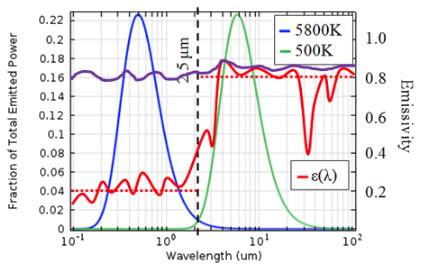
In the following example, the red curve represents the wavelength-dependent surface property for white paint, while the violet curve represents black paint. Absorptivity and emissivity describe the same wavelength-dependent surface behavior under thermal equilibrium, but the terminology depends on whether the surface is absorbing incident solar radiation or emitting thermal radiation. In the solar spectrum, the property is called absorptivity, α(λ), because the surface absorbs incoming sunlight. In the infrared spectrum, it is called emissivity, ε(λ), because the surface emits thermal radiation.
 |
|
A black-painted surface becomes warmer than a white-painted surface under sunlight because black paint absorbs much more solar radiation. Both surfaces have similar infrared emissivity, so they radiate heat away at a similar rate, but the black surface receives much more energy from the Sun.
A finer multispectral analysis is required when two bands are insufficient to capture the relevant wavelength dependence. This is often the case when material properties vary strongly within the infrared region or when radiating surfaces operate at very different absolute temperatures.
Cryogenic systems are a common example. At low temperatures, relatively small absolute temperature differences can correspond to large shifts in the blackbody spectrum. As the ratio of absolute temperatures between radiating surfaces moves farther from unity, the gray-body approximation generally becomes less accurate. In some deep-cryogenic configurations, gray-body analysis can significantly underpredict radiative heat transfer. The magnitude of the error depends on the materials, surface properties, geometry, temperature range, and selected spectral bands.
Cryogenic hardware, including sensitive optics and detectors, often must remain within strict temperature limits to meet performance requirements. In these cases, a multispectral analysis can provide a more accurate estimate of radiative heat transfer.
Spectral band discretization options
Use one of the following options to define the spectral band discretization.
| Option | Required input | Description |
|---|---|---|
| Solar and IR | None | Computes radiative exchange by using only two bands: solar and infrared. |
| Based on Temperature Range | Number of bands, minimum and maximum black body representative temperatures | Defines the specified number of spectral bands, N, between
the estimated minimum and maximum representative temperatures,
Tmin and Tmax, of the
radiation source. Choose N so that radiative power is
distributed appropriately across the bands over this temperature
range. The first and last breakpoint wavelengths,
λmin and λmax, are
calculated by assuming that the first and last spectral bands each
radiate an energy fraction equal to 1/N. The solver defines
the intermediate band boundaries by using logarithmic wavelength
intervals. 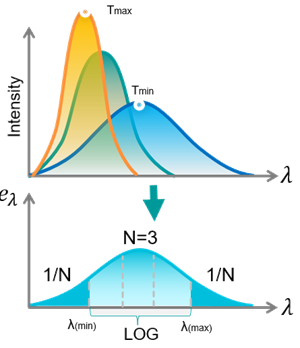
|
| Based on Key Temperatures | Table of representative black body temperatures | Defines spectral bands from a table of representative blackbody
temperatures for the radiation source. The band boundaries are the
peak wavelengths of the blackbody spectrum for each temperature,
based on Wien's law: λ = C3/T, where
λ is the wavelength, T is the temperature, and
C3 is Wien's displacement constant. 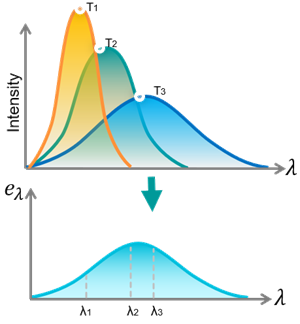 |
| Equal Power Intervals | Number of bands and blackbody temperature | Defines spectral bands from the specified number of bands,
N, and a blackbody temperature, T. The solver
calculates wavelength boundaries so that a blackbody at the
specified temperature radiates equal power into each band. The
wavelength intervals are not equal, but the radiated power in each
band is equal. 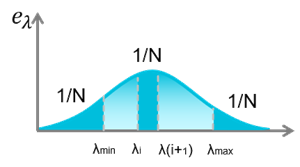
|
| Wavelength Range | Number of bands, minimum wavelength, and maximum wavelength | Defines the specified number of spectral bands, N, between
a specified minimum wavelength, λmin, and a
specified maximum wavelength, λmax. The minimum
wavelength is the upper limit of the lower band, and the maximum
wavelength is the lower limit of the upper band. The solver defines
the intermediate band boundaries by using logarithmic wavelength
intervals. 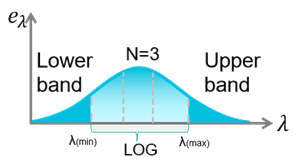
|
| Specify Wavelength | Table of wavelengths | Defines spectral bands from a table of wavelengths, in microns. The specified wavelengths define the boundaries between spectral bands. |
Spectral band definition options
The Solar to IR Transition Wavelength option defines the boundary between the solar and infrared portions of the spectrum. The solver uses this transition wavelength to determine which optical properties apply to each band and which bands participate in infrared radiative exchange.
If you select Full multi-bands, the solver considers all spectral bands, regardless of where the solar-to-infrared transition wavelength occurs. When multiple bands are used and optical properties are defined only as solar or infrared, the solver uses the transition wavelength to determine whether each band uses the nominal solar or infrared optical property.
When multiple bands are used, bands below the transition wavelength do not participate directly in infrared exchange during the thermal solution. Instead, the solver lumps emissive non-gray radiative power from these lower bands into the lowest band that contains the transition wavelength.
The solver uses the full band range for radiative heating calculations. For non-gray infrared heat-transfer calculations, it uses only the bands at and above the transition wavelength.
If you select One band for IR, the solver condenses all bands above the transition wavelength into a single band for gray infrared heat-transfer calculations. Bands below the transition wavelength are still used for solar radiative heating calculations.
How to create multi-spectral band analysis
- In the FEM part, create the Thermo-Optical Properties -
Advanced modeling object with the Non-Gray -
Wavelength Dependent type to define wavelength-dependent
thermo-optical properties, such as emissivity, using a field table assigned to
the relevant model surfaces. In this example, emissivity values are specified as
a function of wavelength in the field table.
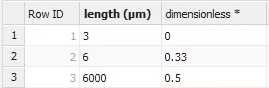
- In the Simulation file, create the Radiation or Radiative Heating simulation object to enable radiative heat-transfer calculations.
- In Solver Parameters, define spectral bands on the Radiation Parameter page by selecting the spectral band discretization method and the Solar to IR transition wavelength.
- Solve the model.