
Create a support ticket
You create a support ticket on the Maya HTT Support Portal portal when you need assistance from our support team with Maya HTT products.
- You need to be logged into the Maya HTT Support Portal portal.
-
In the form, complete all required fields marked with a star and attach any relevant files:
- Enter the mandatory email address, summary, description, priority, platform, product, and operating system information.
- Indicate if this request is a licensing issue or not.
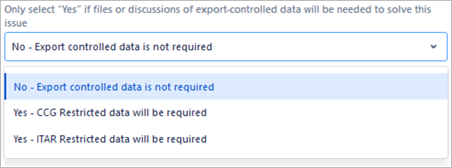
- Set the export control field to No - Export controlled data is not required only if export-controlled data and references are not required to solve the issue.
- Set the export control field to one of the Yes - <type of export-controlled data> will be required options when controlled data is required to solve the issue.
Note:Never attach or discuss restricted data within the ticketing system. The ticket is to be used for tracking purposes only.