
What's new in TMG Correlation v2
In the current version, TMG Correlation provides several new features and functionalities listed on this page. TMG Correlation v2 is available starting with Simcenter 3D 2512.
Design variables on material properties
You can now create design variables on thermal conductivity and specific heat of materials that are available in the correlated solution. After the correlation is complete, the optimized material properties can be updated in the FEM. The model update workflow is supported in both native Simcenter 3D and Teamcenter Integration.
- Prerequisite: A thermal correlation analysis created from a solved original solution.
- Command location:
Creating separate design variables for multiple selections
To streamline your workflow, you can now select multiple quantities in Design Variable Type table and create separate design variables for all selected items in one step when you select the Separate Design Variable per Selection check box. The software automatically generates one design variable for each selected item in the Design Variables table, eliminating one-by-one creation.
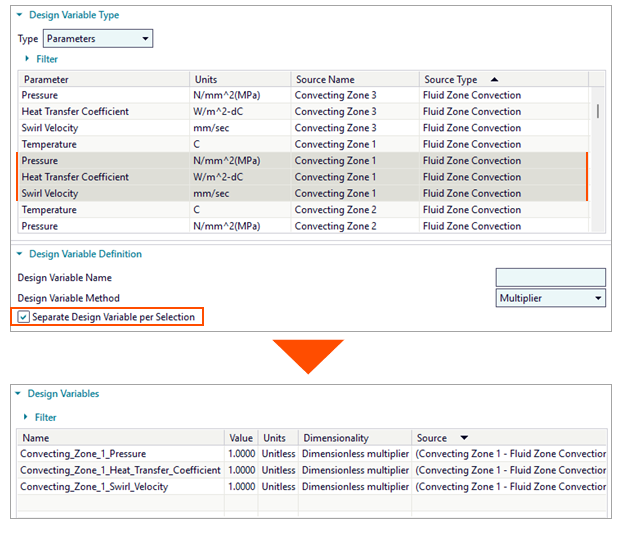
- Prerequisite: A thermal correlation analysis created from a solved original solution.
- Command location: check box
Importing a thermal correlation analysis backup file
You can now import the analysis setup stored in a backup JSON file, which TMG Correlation generates for each analysis when you solve or write solver input files. This backup file contains user interface information for the analysis populated in the TMG Correlation dialog box. It is useful for troubleshooting, contacting support, or journaling to save all setup actions.
- Prerequisite: A loaded Simulation file with the original solution and a backup JSON file for the thermal correlation analysis created from the same solution.
- Command location:
Miscellaneous user interface improvements
- TMG Correlation now displays in the Design Variable table only expressions used in boundary conditions of the original solution.
- The error messages were improved to better capture issues and mitigate them.
- When you delete the original solution in Simcenter 3D, TMG Correlation deletes the corresponding thermal correlation analysis.
- The default number of design cycles was changed to allow correlation to stop after a reasonable time in cases of exploratory correlations that may not converge.
- TMG Correlation remembers the last folder from which you imported sensor data.
Improvements to the TMG Correlation solver
- The TMG Correlation solver now gracefully exits with a clear message when unsupported features are encountered, improving the software robustness.
- 10-30% performance gain per design cycle was achieved compared to previous release by various improvements.
- Reduction of number of design cycles needed by the optimization algorithms to reach the objective function.